
Built-in Web Player
rtp2httpd includes a modern web-based player that allows you to watch configured M3U channel lists directly in your browser without installing any client software.
Access
After configuring M3U playlists, access the player via your browser:
http://server:port/playerExample:
http://192.168.1.1:5140/playerThe player page path can be customized via the player-page-path configuration option. Setting it to / enables direct access without any path.
Features
- Channel List: Automatically loads configured M3U channel lists
- Live Streaming: Watch live broadcasts directly in the browser
- Time-Shifted Playback: Supports EPG (Electronic Program Guide) and time-shifted playback (requires catchup source)
- Fast Startup: Achieves millisecond-level channel switching with FCC
- Seamless Channel Switching: Preloads the new stream when switching channels to reduce black screens
- Responsive Design: UI adapts to both desktop and mobile devices
- PWA Support: Can be added to the home screen on phones, tablets, desktops, or LG webOS TVs for app-like quick access
- Zero Overhead: Pure web frontend implementation with virtually no resource overhead on rtp2httpd (no decoding/transcoding overhead)
IMPORTANT
The player relies on the browser's native decoding capabilities. Some encoding formats (such as E-AC3) may not play in certain browsers (manifested as no audio or black screen). We recommend using the latest versions of Chrome, Edge, or Safari.
PWA Support and Add to Home Screen
The built-in web player supports PWA (Progressive Web App). You can add the player page to your device's home screen (including phones, tablets, computers, and LG webOS smart TVs) and launch it like a native app for a full-screen, immersive viewing experience.
After adding to the home screen, the desktop icon is named IPTV by default and uses the built-in app icon. The player retains local settings such as theme preferences.
iOS / iPadOS (Safari)
- Open the player page in Safari (for example,
http://192.168.1.1:5140/player) - Tap Share in the extensions menu on the left side of the address bar
- Scroll down in the share menu and select Add to Home Screen
- Confirm the name and tap Add
Android (Chrome, Edge, etc.)
- Open the player page in your browser
- Tap the Menu button (⋮) in the top-right corner
- Select Add to Home screen or Install app
- Confirm when prompted
Some browsers also show an install banner in the address bar or at the bottom of the page. Tap Install or Add to complete the process.
Desktop (Chrome, Edge)
- Open the player page in your browser
- Click the Install icon in the address bar (if available), or choose Cast, save, and share → Create shortcut from the browser menu
- Confirm when prompted
Once installed, the player runs in a standalone window and can be launched quickly from the system app list, Dock, or taskbar.
LG TV (webOS)
LG webOS smart TVs can also use the built-in browser to open the player and pin it to the TV home screen:
- Open the Web Browser app on your TV
- Enter the player page URL in the address bar (for example,
http://192.168.1.1:5140/player) - Open the browser menu and select Add shortcut to the Home screen
- Return to the TV home screen and launch the player from the shortcut
NOTE
If you customized the player path via player-page-path, use the actual path when adding to the home screen. The shortcut is pinned to the URL used at the time of adding, including query parameters such as r2h-token (if present).
Channel Aggregation
When multiple channels with the same group and same name exist in the M3U, the player automatically aggregates them into multiple sources of one channel, displaying them only once in the channel list. Users can switch between different sources (such as different quality levels) using the source selector:
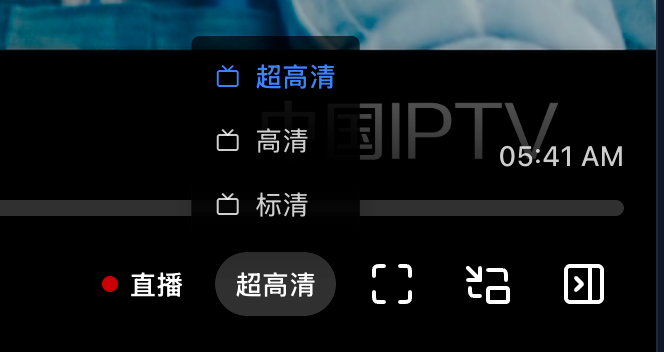
If a source URL has a $label suffix, the player extracts it as the source's display label (such as "UHD", "HD", "SD"). Sources without $label are displayed with sequential numbers (such as "Source 1", "Source 2").
NOTE
Channel aggregation is a frontend feature of the built-in web player, not a server-side behavior of rtp2httpd. Whether third-party players (such as APTV, TiviMate, etc.) support similar aggregated display depends on their own implementation. The rtp2httpd server only parses $label, generates independent service paths, and preserves $label in the converted M3U.
For M3U configuration of source labels, see M3U Playlist Integration.
Seamless Channel Switching
The built-in web player enables seamless channel switching by default. When you change channels or switch sources, the player preloads the new stream in the background and switches the video once the new stream is ready, reducing black screens and wait time. Combined with FCC Fast Channel Change, this delivers a smoother channel switching experience.
This feature uses dual-slot preloading. Because two video streams are pulled simultaneously for a brief period during channel switching, you may experience stuttering when switching channels if your bandwidth is limited (for example, when accessing rtp2httpd over the public internet), or if the upstream only supports a single multicast stream. In that case, you can manually disable this option in the Settings menu (gear icon) at the top-right of the player page by turning off Seamless switch. When disabled, the player stops the current stream before loading the new one, using less bandwidth but may show a brief black screen during switching.
Time Placeholders
The built-in web player supports the following time placeholder formats, which can be used in M3U catchup-source URLs:
${} Format (uses long format)
| Placeholder | Description | Example Output |
|---|---|---|
${utc} | Program start time (UTC, ISO8601 format) | 2025-01-15T10:30:45.000Z |
${utc:yyyyMMddHHmmss} | Program start time (UTC, custom long format) | 20250115103045 |
${utcend} | Program end time (UTC, ISO8601 format) | 2025-01-15T12:30:45.000Z |
${utcend:yyyyMMddHHmmss} | Program end time (UTC, custom long format) | 20250115123045 |
${start} | Same as ${utc} | 2025-01-15T10:30:45.000Z |
${start:yyyyMMddHHmmss} | Same as ${utc:yyyyMMddHHmmss} | 20250115103045 |
${end} | Same as ${utcend} | 2025-01-15T12:30:45.000Z |
${end:yyyyMMddHHmmss} | Same as ${utcend:yyyyMMddHHmmss} | 20250115123045 |
${lutc} | Current time (UTC, ISO8601 format) | 2025-01-15T14:00:00.000Z |
${lutc:yyyyMMddHHmmss} | Current time (UTC, custom long format) | 20250115140000 |
${now} | Same as ${lutc} | 2025-01-15T14:00:00.000Z |
${now:yyyyMMddHHmmss} | Same as ${lutc:yyyyMMddHHmmss} | 20250115140000 |
${timestamp} | Current Unix timestamp (seconds) | 1736949600 |
${timestamp:yyyyMMddHHmmss} | Same as ${lutc:yyyyMMddHHmmss} | 20250115140000 |
${(b)yyyyMMddHHmmss} | Program start time (local time, long format) | 20250115183045 |
${(e)yyyyMMddHHmmss} | Program end time (local time, long format) | 20250115203045 |
${(b)yyyyMMdd|UTC} | Program start time (UTC, long format) | 20250115103045 |
${(e)yyyyMMdd|UTC} | Program end time (UTC, long format) | 20250115123045 |
${(b)timestamp} | Program start time Unix timestamp (seconds) | 1736937045 |
${(e)timestamp} | Program end time Unix timestamp (seconds) | 1736944245 |
${yyyy} | Program start time: 4-digit year (local time) | 2025 |
${MM} | Program start time: month 01-12 (local time) | 01 |
${dd} | Program start time: day 01-31 (local time) | 15 |
${HH} | Program start time: hour 00-23 (local time) | 18 |
${mm} | Program start time: minute 00-59 (local time) | 30 |
${ss} | Program start time: second 00-59 (local time) | 45 |
${duration} | Program duration (seconds) | 7200 |
${offset} | Seconds elapsed since program start | 12600 |
{} Format (uses short format)
| Placeholder | Description | Example Output |
|---|---|---|
{utc} | Program start time (UTC, ISO8601 format) | 2025-01-15T10:30:45.000Z |
{utc:YmdHMS} | Program start time (UTC, custom short format) | 20250115103045 |
{utcend} | Program end time (UTC, ISO8601 format) | 2025-01-15T12:30:45.000Z |
{utcend:YmdHMS} | Program end time (UTC, custom short format) | 20250115123045 |
{start} | Same as {utc} | 2025-01-15T10:30:45.000Z |
{start:YmdHMS} | Same as {utc:YmdHMS} | 20250115103045 |
{end} | Same as {utcend} | 2025-01-15T12:30:45.000Z |
{end:YmdHMS} | Same as {utcend:YmdHMS} | 20250115123045 |
{lutc} | Current time (UTC, ISO8601 format) | 2025-01-15T14:00:00.000Z |
{lutc:YmdHMS} | Current time (UTC, custom short format) | 20250115140000 |
{now} | Same as {lutc} | 2025-01-15T14:00:00.000Z |
{now:YmdHMS} | Same as {lutc:YmdHMS} | 20250115140000 |
{timestamp} | Current Unix timestamp (seconds) | 1736949600 |
{timestamp:YmdHMS} | Same as {lutc:YmdHMS} | 20250115140000 |
{(b)YmdHMS} | Program start time (local time, short format) | 20250115183045 |
{(e)YmdHMS} | Program end time (local time, short format) | 20250115203045 |
{(b)YmdHMS|UTC} | Program start time (UTC, short format) | 20250115103045 |
{(e)YmdHMS|UTC} | Program end time (UTC, short format) | 20250115123045 |
{(b)timestamp} | Program start time Unix timestamp (seconds) | 1736937045 |
{(e)timestamp} | Program end time Unix timestamp (seconds) | 1736944245 |
{Y} | Program start time: 4-digit year (local time) | 2025 |
{m} | Program start time: month 01-12 (local time) | 01 |
{d} | Program start time: day 01-31 (local time) | 15 |
{H} | Program start time: hour 00-23 (local time) | 18 |
{M} | Program start time: minute 00-59 (local time) | 30 |
{S} | Program start time: second 00-59 (local time) | 45 |
{duration} | Program duration (seconds) | 7200 |
{offset} | Seconds elapsed since program start | 12600 |
Format Description
Long Format: Used for custom formats in ${} brackets
yyyy- 4-digit yearMM- 2-digit month (01-12)dd- 2-digit day (01-31)HH- 2-digit hour (00-23)mm- 2-digit minute (00-59)ss- 2-digit second (00-59)
Example: ${utc:yyyyMMddHHmmss} → 20250115103045
Short Format: Used for custom formats in {} brackets
Y- 4-digit yearm- 2-digit month (01-12)d- 2-digit day (01-31)H- 2-digit hour (00-23)M- 2-digit minute (00-59)S- 2-digit second (00-59)
Example: {utc:YmdHMS} → 20250115103045
Related Documentation
- M3U Playlist Integration: M3U configuration and source labels
- FCC Fast Channel Change Setup: Enable millisecond-level channel switching
- Configuration Reference: Player-related configuration parameters